How do I install and register the WV-ASM300?
- Management Software(ASM)
- Installation/Configuration
After download and install the software, license registration is required. Please refer to the procedure below.
1. Download and install the software from i-PRO’s global resource page:
WV-ASM300 | i-PRO Products
2. When launching ASM300 for the first time, you will be prompted to register the software, and will be brought to the Registration of License screen.
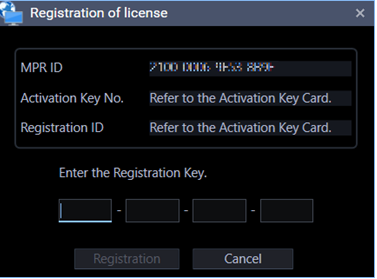
3. Obtain a Registration Key (license). There are 3 options available for a new install.
OPTION 1: Full Version License
After purchasing the WVASM300W license, you will receive 2 activation codes.
Activation Key and Registration ID
Take note of the MPR ID generated by ASM300 and register these 3 pieces of information to our KMS site to obtain a Registration Key.
For detailed instructions on product registration to our KMS site, see the following URL:
WV-ASM300 Series Software Activation Procedure | i-PRO Products
OPTION 2: Lite Version License
The following activation codes can be used indefinitely and at no cost, but with limitations.
Activation Key: 0408 - 0065 - 000A - BC01
Registration ID: 5197 - EC85
For detailed instructions on product registration to our KMS site, see the following URL:
WV-ASM300 Series Software Activation Procedure | i-PRO Products
OPTION 3: Demo License
The following Registration Key can be entered immediately to unlock the full version software.
The trial period is for 90 days.
Registration Key: 0000-0010-0000-0002
For a detailed list of the differences between each license type, see the following URL:
What are the differences between the license types for WV-ASM300?
4. Enter the Registration Key and click Registration
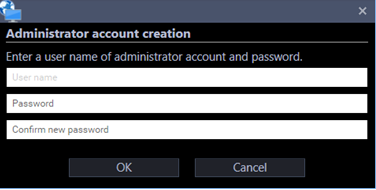
5. When prompted, create an Administrator login, then you can begin using the software.
Article number:en124681
Last updated:October 29, 2025
Was this article helpful?