How can I get 4 unique streams from an i-PRO Fisheye camera using RTSP?
- Network Cameras
- Installation/Configuration
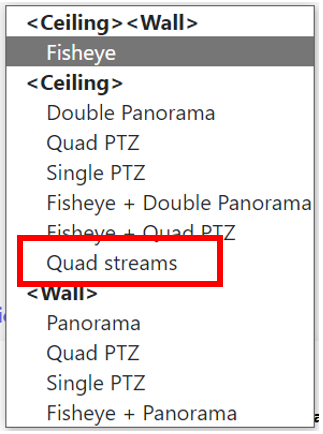
You can get 4 unique streams by setting the Image capture mode to Quad streams.
Step 1: Change the Image Capture Mode
・Access the camera’s web interface
・Click on the Setup icon
・Select the Stream tab
・Click on the Image Capture Mode to display the dropdown list
・Select Quad Streams

Step 2: RTSP Commands for Each Stream/View
Now that the fisheye camera’s image has been dewarped into 4 unique streams, the following RTSP commands can be used to pull video.
192.168.0.10 is a sample IP address. Replace this with the IP of your camera.
rtsp://192.168.0.10/Src/MediaInput/stream_1/ch_1
rtsp://192.168.0.10/Src/MediaInput/stream_1/ch_2
rtsp://192.168.0.10/Src/MediaInput/stream_1/ch_3
rtsp://192.168.0.10/Src/MediaInput/stream_1/ch_4
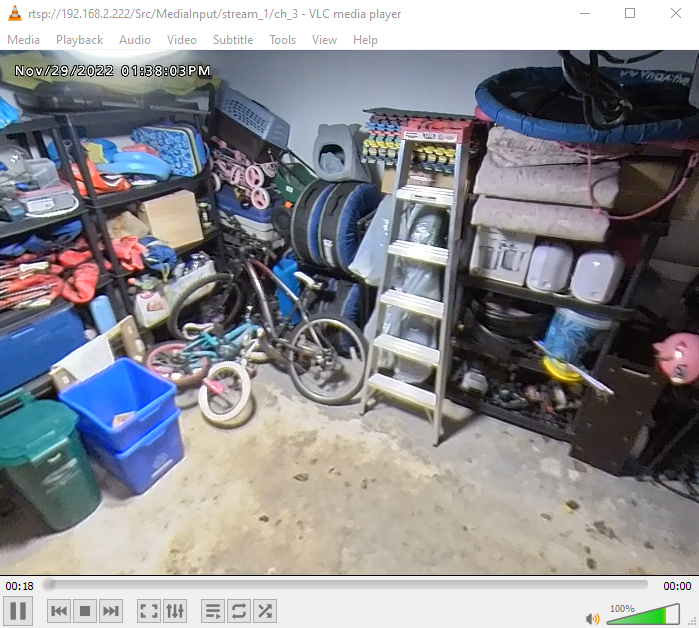
Example of RTSP stream from view 3 on VLC Player
Article number:en124496
Last updated:October 20, 2025
Was this article helpful?