Notes on using PTZ Network Cameras with built-in slip ring
Updated in September 2023
A PTZ network camera with 360 degree endless panning has a built-in slip ring that can transmit power and signals.
If the slip ring is not clean due to dust etc., noise or connection issues can happen during the pan (horizontal rotation) operation.
Applicable PTZ cameras:
PTZ Network Camera with 360 degee endless pannnig*
*Panning range can be confirmed on:
- [SPECIFICATIONS] tab of the product page
- "Important Information" or "Basic Information" of the camera in use - Download available at Documentation Database
Occurrence conditions:
1. The camera keeps moving between certain positions for a long time (e.g. Auto pan)
2. The camera performs panning only occasionally
Phenomenon:
The following phenomenon can happen when the camera connection becomes unstable due to the condition of a slip ring:
a. Noise occurs on the whole or a part of the image as below.
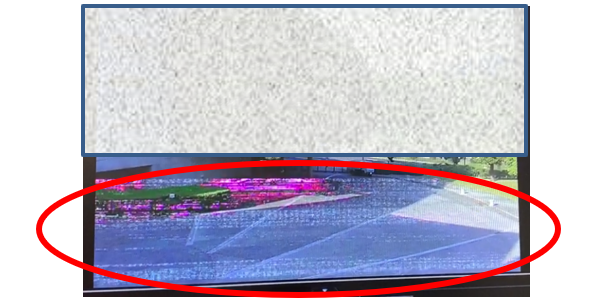
b. Live image is lagging or does not appear
c. Camera restarts
*When the camera is connected to a recorder, "Communication error" occurs on the recorder
Recommended setting:
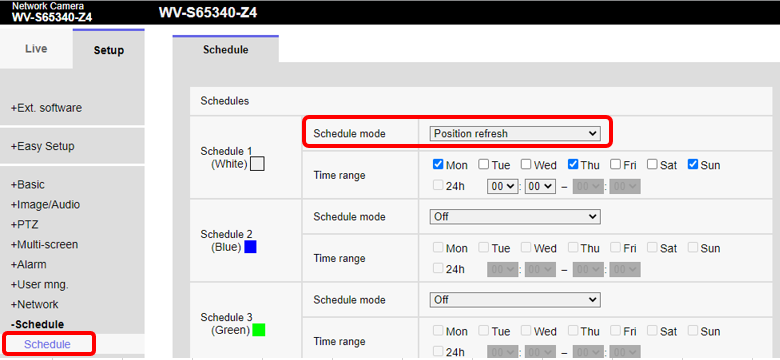
Configure the schedule to perform periodical "Position Refresh" in the [Schedule] setup window.
*Note : Operating the camera will be unavailable during the position refresh process for about 2 minutes.