Why is VI Monitor Plus freezing for no obvious reason?
- Video Insight VMS
- Troubleshooting
One possibility is that the Windows Virtual Memory is low. Try increasing this to see if it stabilizes the client software.
Increasing Virtual Memory in Windows 10
- Go to the Start Menu and click on Settings.
- Type/search “performance”.
- Choose “Adjust the appearance and performance of Windows”.
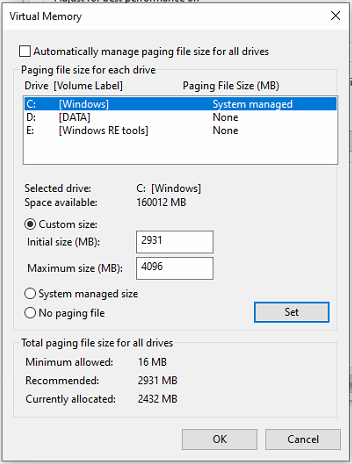
- In the new window, go to the Advanced tab and under the Virtual Memory section, click on Change.
- At the bottom of the new window, check what the Recommended value is and how it compares to Currently Allocated.
- If the Current Allocated is significantly less than the Recommended, uncheck the “Automatically manage paging file size for all drives” box at the top of the same windows and then click on “Custom size”.
- Enter the Recommended value in the “Initial Size” box, and a larger figure in the “Maximum size” box.
Click OK to save the new settings. - Restart the Server (PC).
- If VI Monitor Plus continues to freeze, please contact Technical Support.
Article number:us-en123321
Last updated:June 16, 2025
Was this article helpful?
Thank you for your feedback!