How do I enable "Browser Access" on the camera?
- Network Cameras
- Browser/OS support
- Installation/Configuration
Problem Description
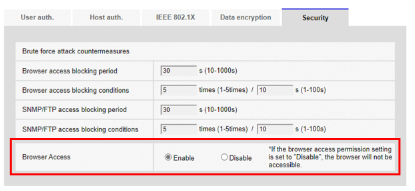
The camera screen is not accessible, so please activate it in the following way
- Send the CGI command to activate
- Initialize the camera
- Send the CGI command to activate
http://(IP address)/cgi-bin/setdata?LIVE_ACCESS=1 - Initialize the camera
Press the INITIAL SET button to initialize the main unit. See below for the position of the INITIAL SET button.
(1) Disconnect the Ethernet cable from the computer and turn off the computer.
(2) Turn on the computer while pressing the [INITIAL SET] button.
(3) [INITIAL SET] button holds pressing for 15 seconds or more after power is turned on
(4) Release the [INITIAL SET] button
Article number:us-en121196
Last updated:October 20, 2025
Was this article helpful?
Thank you for your feedback!