Why can't I see the VI Monitor Plus window?
- Video Insight VMS
- Troubleshooting
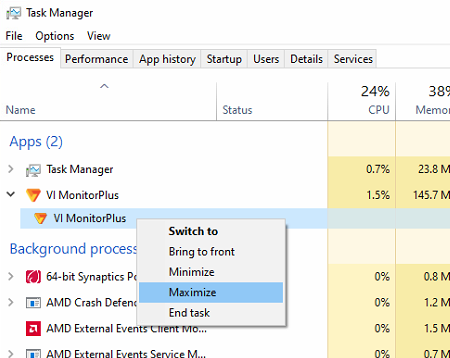
If VI Monitor Plus is running but you’re having a difficult time locating the application in the taskbar or possibly it’s not showing, try using Windows Task Manager to maximize and display the window.
1. Open Windows Task Manager
2. Locate VI MonitorPlus and click to expand the App
3. For the sub VI MonitorPlus process that shows, right click on it
4. Select Maximize
Article number:us-en121066
Last updated:June 06, 2025
Was this article helpful?
Thank you for your feedback!