How can I improve the accuracy of Mask/No Mask detection when using AI People detection with Active Guard Server?
- Analytics
- Installation/Configuration
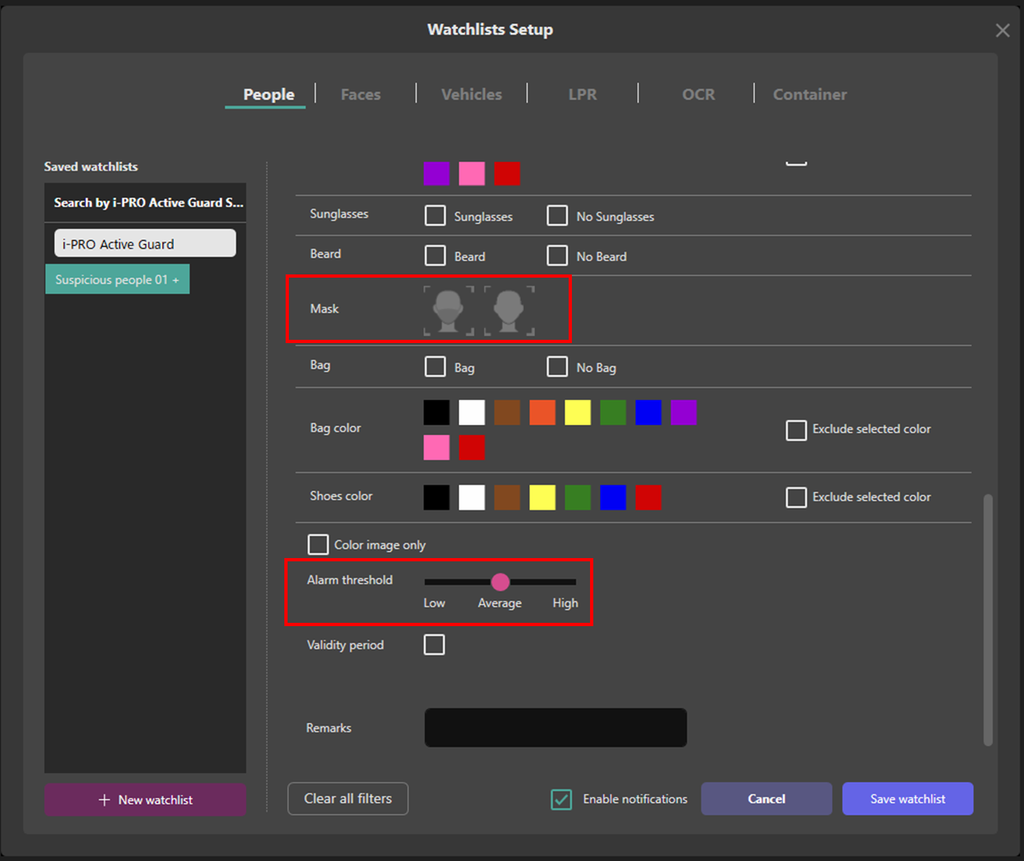
In the Watchlists Setup - People screen of the Active Guard Server, select "Mask" or "No Mask", then set the "Alarm threshold" to "High".
When ”Mask” is selected and the ”Alarm threshold” is set to “High”, an alarm will only trigger with a high detection score, making “Mask” alarms less likely to be raised. Similarly, when “No Mask” is selected and the “Alarm threshold” is set to “High”, an alarm will only trigger with a high detection score, reducing false alarms for “No Mask”. This setting can help decrease false positives in each case.
Article number:eu-en122846
Last updated:October 21, 2025
Was this article helpful?
Thank you for your feedback!