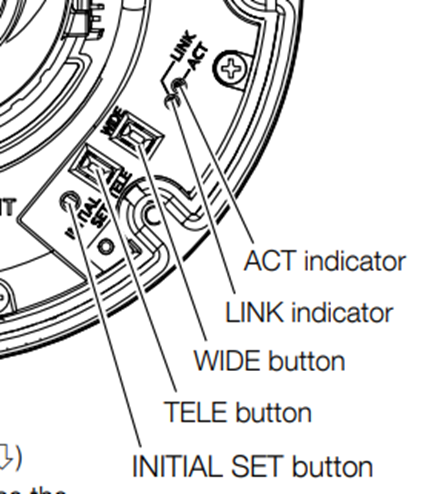
Where is the button to switch to auto focus on the dome camera such as WV-U2xxx series or WV-S2xx6 series?
- Network Cameras
- Specification
Dome camera no longer has a button to activate only the autofocus function. Either TELE or WIDE button inside the dome cover is also used for the autofocus function. Pressing either button activates the TELE/WIDE function, then start the auto focus function.
The autofocus function starts in 3 seconds after releasing the TELE button or WIDE button.
During autofocus no other operations will be accepted.
Article number:eu-en122531
Last updated:June 11, 2025
Was this article helpful?
Thank you for your feedback!