AI applications for 360-degree fisheye camera i-PRO
AI applications
AI-VMD/AI People Counting for 360-degree fisheye camera
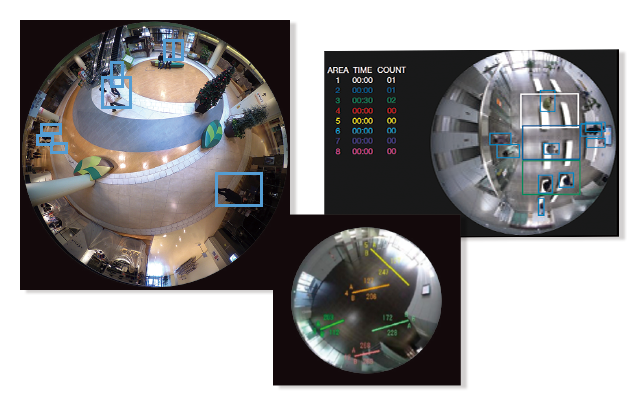
- People Counting
- Heat map
- Occupancy detection
AI Privacy Guard for 360-degree fisheye camera
- AI Privacy Guard
AI-VMD/AI People Counting for 360-degree fisheye camera
People Counting
Cross Line Counting
Counts the number of people moving in a specified direction and cross a specified threshold.
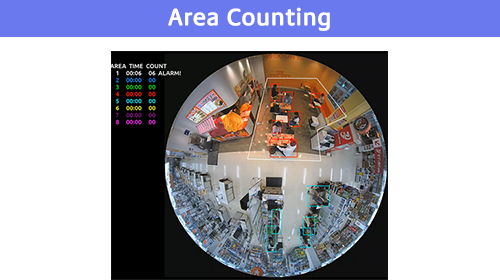
Area Counting(Queue Management)
Counts the number of people in the set area.
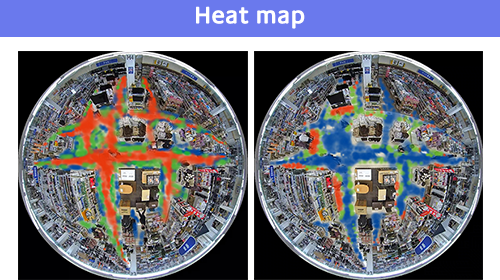
Heat map
Heat mapping provides statistical information about traffic flow and keeps counts for people passing through and loitering in the area.
Occupancy detection
The network camera uses its AI engine to detect congestion, providing data that can be used to direct visitor traffic flow in advance or help staff work more efficiently.
AI Privacy Guard for 360-degree fisheye camera
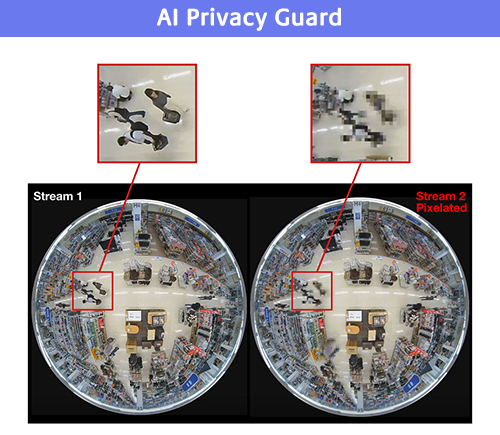
AI Privacy Guard
AI can automatically mosaic faces and figures of people who are photographed to safeguard privacy and portrait rights.
Specifications
Data Sheet

A&E Spec Sheet

Manuals
Web Guide
User Manual/Operating Instruction


Firmware/Software
Software
![AI Privacy Guard for 360-degree fisheye [Type1]](/products_and_solutions/themes/custom/ipro/assets/images/common/icon/products_documents_icon.jpg)
AI Privacy Guard for 360-degree fisheye [Type1]
AI-VMD AI People Counting for 360-degree fisheye [Type1]
Version 4.30 Release Note
[Important notice]
1. Refer to Installation conditions for applications on i-PRO Network Camera with AI Engine for the below information:
- the ROM size and RAM size this extension software uses
- The memory capacity each camera holds for extension software
2. Upgrade camera firmware to the latest version, and then install or update this extension software.
- Especially when updating the app to version V4.00 or later, please ensure that the camera firmware is updated to V3.50 or later, as the application may not operate correctly unless both are updated.
3. For configuration (detection area etc.), use the latest version of i-PRO configuration tool (iCT).