Focus adjustment of the cameras with Day & Night function
Revised in January, 2023
This article explains how to avoid the out-of-focus blur when the camera switches between color mode and black & white mode.
Applicable models:
- Cameras with “auto back focus (ABF)” or “auto focus (lens AF)” in addition to the “Day & Night” function
Phenomenon:
- Out-of-focus blur occurs on the image after the mode is switched from color to black & white / black & white to color.
Cause of out-of-focus blur:
- Focus adjustment by the Auto focus does not operate properly due to the following conditions:
- Low light conditions
- A spot light is captured on the image
- The captured subject has less contrast
Countermeasure:
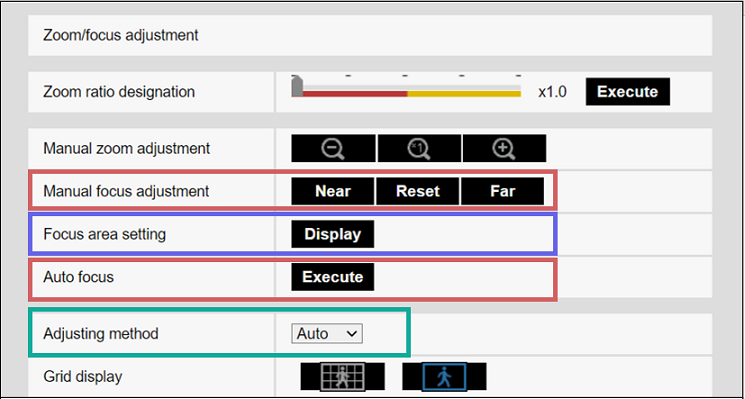
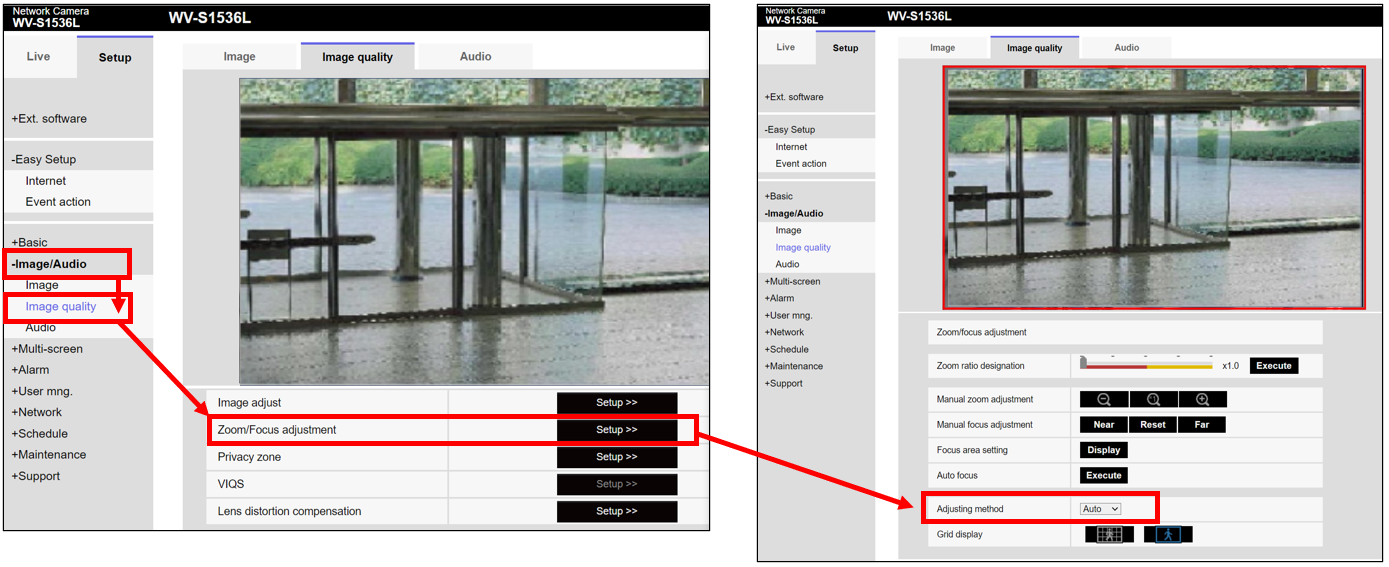
- Refer to the Focus behavior of Preset, Fix, and Auto carefully and select an appropriate focus behavior for [Adjustment method]*, to avoid out-of-focus blur in your environment.
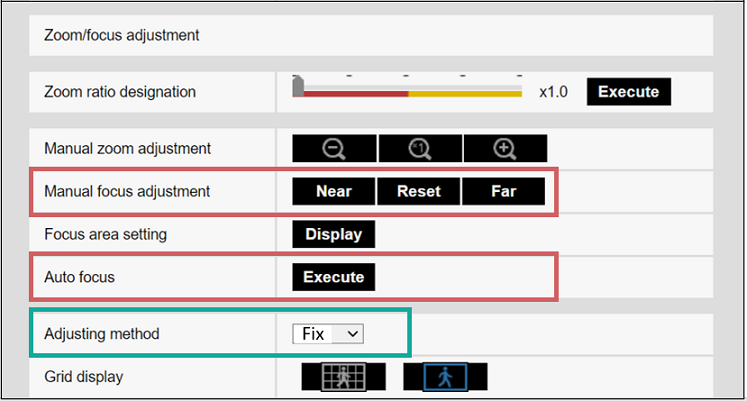
*Go to [Image/Audio] > [Image quality] > [Zoom/Focus adjustment] (or [Back focus] or [Focus])> [Setup>>] > [Adjusting method]
Focus behavior of Preset, Fix, and Auto:
| Adjustment method | The focus behaviors | The focus position when switching to: | |
| Color mode | Black & white mode | ||
| Preset | The focus moves to the position adjusted in each mode when switching between the color mode and the black & white mode. | The focus moves to the position adjusted by ABF(AF) or manually in color mode. | The focus moves to the position adjusted by ABF (AF) or manually in black & white mode. |
| Fix | The focus is fixed on the same position in both color mode and black & white mode. | The focus stays on the position most recently adjusted by ABF (AF) or manually, in both color mode and black & white mode. | |
| Auto | The focus position most recently adjusted by ABF (AF) or manually in color or black & white mode is stored as an original position. When the mode is switched from the one with the adjusted original position to another: -> The camera automatically adjusts the focus. When the mode is switched back: -> The focus returns to the original position. |
When the original position is stored in color mode | |
| The focus moves to the position adjusted by ABF (AF) or manually in color mode. | Auto focus is automatically performed. | ||
| When the original position is stored in black & white mode | |||
| Auto focus is automatically performed. | The focus moves to the position adjusted by ABF (AF) or manually in black & white mode. | ||
Setting procedures:
Select the focus adjustment procedure from [A] Preset, [B] Fix, and [C] Auto.
*[A] - [C] listed in recommended order
[A] Preset (Recommended)
"Preset" adjust the focus to the each configured position when switching between color mode and black & white mode.
Setting procedure of [A] Preset
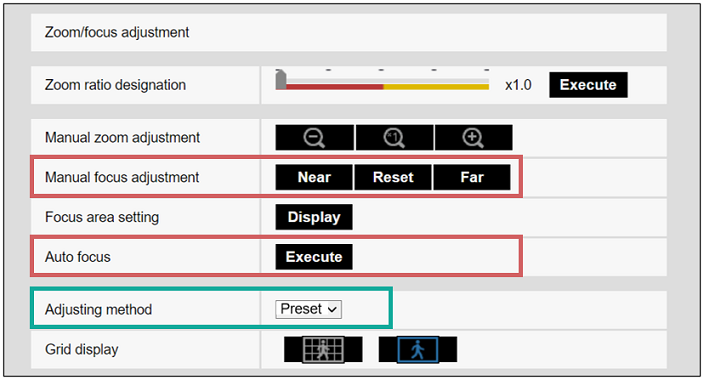
1. Select "Preset" for [Adjusting method]
2. Execute [Auto focus] or [Manual focus adjustment] in color mode during daytime
-> The focus position in color mode is stored.
3. Execute [Auto focus] or [Manual focus adjustment] in black & white mode during the nighttime*
-> The focus position in black & white mode is stored.
*When you cannot adjust the focus during the nighttime:
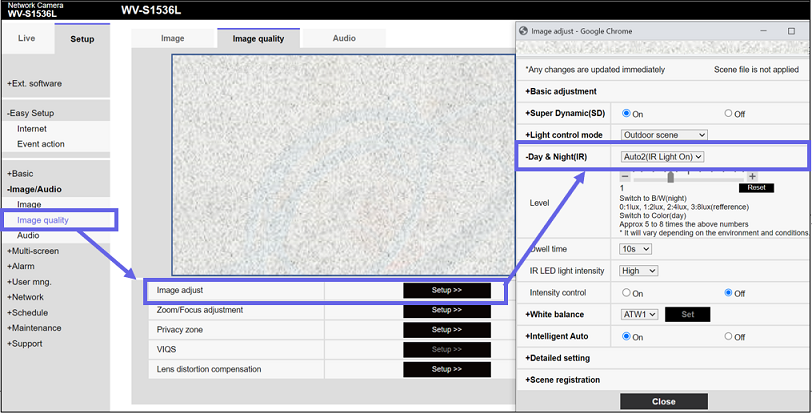
Go to the [Image quality] window, click the [Setup>>] button of [Image adjust].
Select "On(IR Light On)" or "On(IR Light Off)" for [Day & Night(IR)] to force switch to the black & white mode, and then adjust the focus by executing [Auto focus] or [Manual focus adjustment].
After adjustment, switch the [Day & Night(IR)] back to the original option "Auto2 (IR Light On)" or "Auto1 (IR Light Off)".
[B] Fix
"Fix" uses the same focus position adjusted by ABF (AF) or manual focus adjustment, in both color mode and black & white mode.
Setting procedure of [B] Fix
1. Execute [Auto focus] or [Manual focus adjustment] in color mode during daytime.
-> The focus position in color mode is stored.
2. Change the [Adjusting method] to "Fix".
-> The camera will use the same focus position in black & white mode.
3. Confirm the focus accuracy during the nighttime in black & white mode.
[C] Auto
"Auto" adjusts and corrects the focus position automatically when switching between color mode and black & white mode.
Setting procedure of [C] Auto
1. Check the environment in black & white mode during the nighttime.
When spotlights such as streetlights are on the image, specify the area with [Focus area setting] to avoid the lights.
2. Execute [Auto focus] or [Manual focus adjustment] in black & white mode during the nighttime
3. Check the focus accuracy.
Note: Do not execute [Auto focus] or [Manual focus adjustment] in color mode during daytime after the step1-3 above.