An error message "Camera error. Please check camera body" appears when WV-X6533LNS/WV-X6533LN/WV-S6532LNS are powered on.
- Network Cameras
- Troubleshooting
The camera has failed to detect the origin.
When the pan and tilt do not work properly due to the packaging tape on the camera or other obstacles, camera fails to detect the origin position.
Remove the packaging tape or other obstacles and restart the camera.
In case of Easy kitting:
The error message appears when you place the carton vertically. Place the carton box horizontally as described on the box while kitting.
Note:
The error message appears even when the carton box is placed properly as the camera is lying on its side in the box. In this case, you can ignore the message.
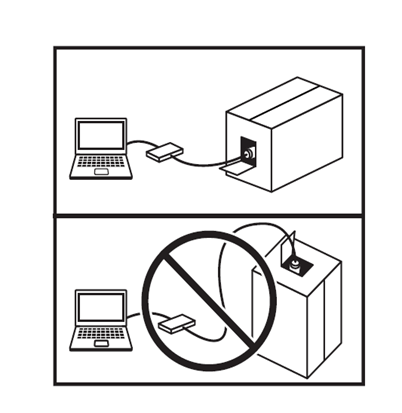
Note:
The error message will still displayed even when you place the carton box horizontally. This is an error message that detects the horizontal posture of the camera. In this case, you can ignore the message and proceed.
Article number:us-en122176
Last updated:June 10, 2025
Was this article helpful?