In Security Radar, false detections are occurring. What should I check and how can I address this?
- System Products
- Troubleshooting
Please reduce false detections by masking unnecessary areas and adjusting the Detection Sensitivity and Fluctuation Filter Strength according to the installation environment, noting that higher filter strength may delay detection or increase missed detections in certain conditions.
Please check the following items:
・Set a mask for areas where detection is unnecessary and movement can occur.
・Review the [Detection Filter Settings] to prevent unnecessary detection icons from appearing.
・Adjust the [Detection Sensitivity] and [Fluctuation Filter Strength] according to the installation environment referring to the points below.
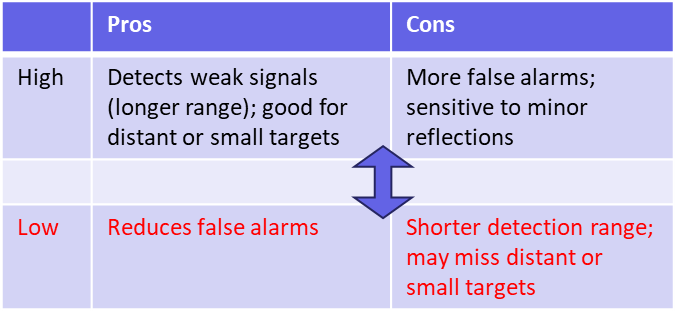
[Detection Sensitivity]
This setting controls the sensitivity to signal strength. Lower sensitivity reduces false detections.
[Fluctuation Filter Strength]
This setting controls sensitivity to target movement.
Higher filter strength (High > Mid > Low > Off) detects only larger movements.
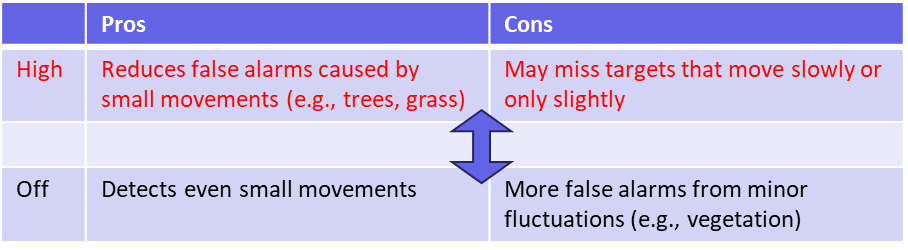
Note when using higher filter strength:
・The target may not be detected w/o larger movement, and detection may take longer.
・The risk of missed detection can increase in the following cases:
- When the detection area is narrow
- When using line‑cross detection
- Fast‑moving targets
Article number:eu-en131696
Last updated:March 24, 2026
Was this article helpful?