When logged in as an Active Directory non-Admin user account, why can't I select Access Levels on the Personnel Page?
- Video Insight VMS
- Troubleshooting
Problem Description:
You are logged in with an Active Directory Non-Admin User account, and are unable to select or de-select any access level under the access level tab on the Personnel Page. No matter who you select to adjust the access level for, you cannot make any selection. The selection option seems unresponsive to mouse clicks.

This could happen if you upgraded your MonitorCast Server from v4.5.X to v4.7.X. Communication between the domain controller and the MonitorCast server has been disrupted.
・Log into [MonitorCast] → [Administrator]
・Navigate to [Administration] → [User Groups]
・Select the Active Directory User Group and delete.
・Click on Import AD/VMS User Group from the top right button on MonitorCast Web Interface
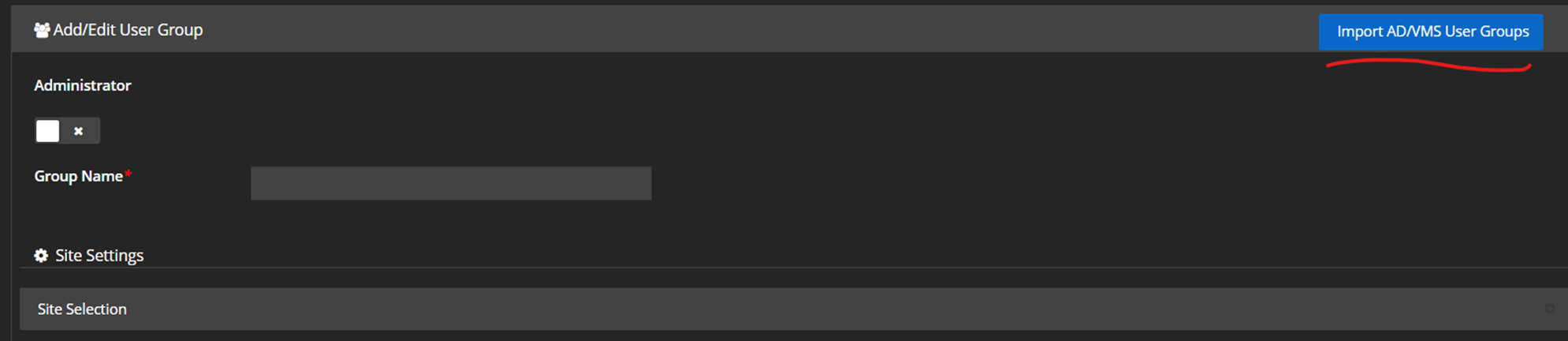
・Select the domain and search for the AD User Groups
・Add the User group, select the permissions that you want to have for the non-admin users. Hit Save.
・Log out and log into the MonitorCast as an AD Non-Admin User Account.
・Navigate to the Personnel Page and make the selections on Access Levels. This time it will allow you to make chang
Article number:eu-en124386
Last updated:June 17, 2025
Was this article helpful?