I would like to issue the alarm while the object is in a certain area and stop the alarm when the object leaves a certain area by using camera AI function. How can I achieve this?
- Network Cameras
- Installation/Configuration
It is possible to achieve this by using AI function of the combination of Onsite Learning and AI Video Motion Detection (Intruders).
In camera setting, please set the following items and use Terminal 2 as an alarm output.
The setup process will be explained using screen images.
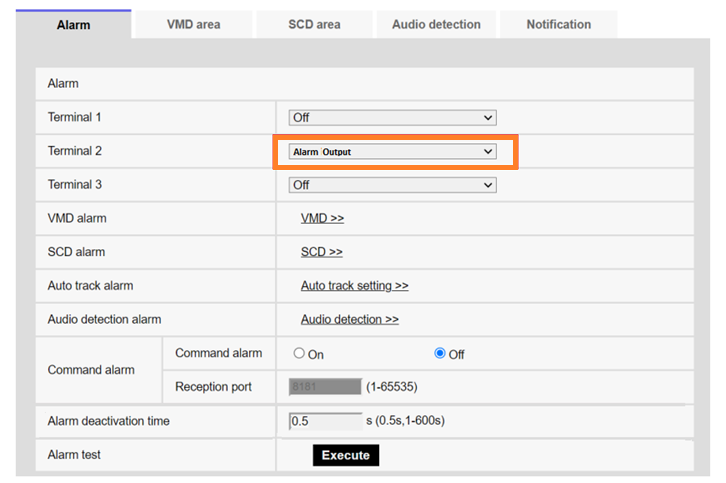
1. Setup - Alarm - [Alarm] tab
・Terminal 2: Alarm Output
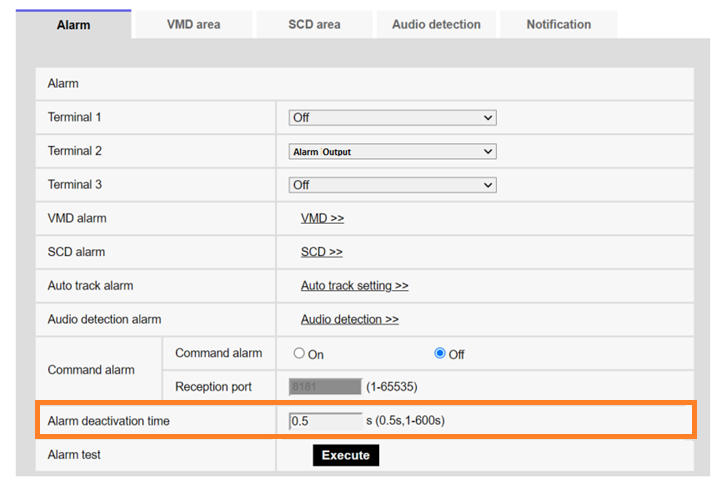
2. Setup - Alarm - [Alarm] tab
・Alarm Deactivation time: 0.5 seconds
Article number:eu-en123466
Last updated:October 21, 2025
Was this article helpful?
Thank you for your feedback!