How do I delete the Viewnetcam account?
- Network Cameras
- Operation
Log in to the WEB site “i-PRO Viewnetcam” and delete the Viewnetcam account.
[Procedure]
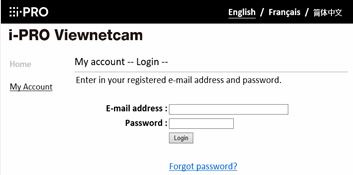
1. Go to the URL " https://www.viewnetcam.com/ip_ddns/ " and click "My account" menu at the left side of the page.
2. Enter “E-mail address” and “Password” and click [ login ] button.
# If you forget the Password, click “Forgot password?”.
3. After you logged in, select the domain name to be deleted and delete the Viewnetcam account.
Article number:eu-en121201
Last updated:June 10, 2025
Was this article helpful?
Thank you for your feedback!