Why is VI's Web Client video not smooth when displaying a multi-camera view?
- Video Insight VMS
- Troubleshooting
When you access VI’s Web Client 7 and display a single camera, the live video is smooth and shows at the expected framerate.
But when using the multi-camera view, a couple of cameras still show fine, but the rest are choppy, not smooth, and show a low framerate.
Due to web browser limitations, the VI Web Client will begin to pull MJPEG video at low framerate when multiple cameras are displayed. The Web Client was designed to do this is in order to reduce the processing load on the PC workstation.
Note:
If viewing multiple cameras at higher framerates is a requirement, it’s recommended to use VI Monitor Plus.
The following details were sourced from the VI Administrative guide:
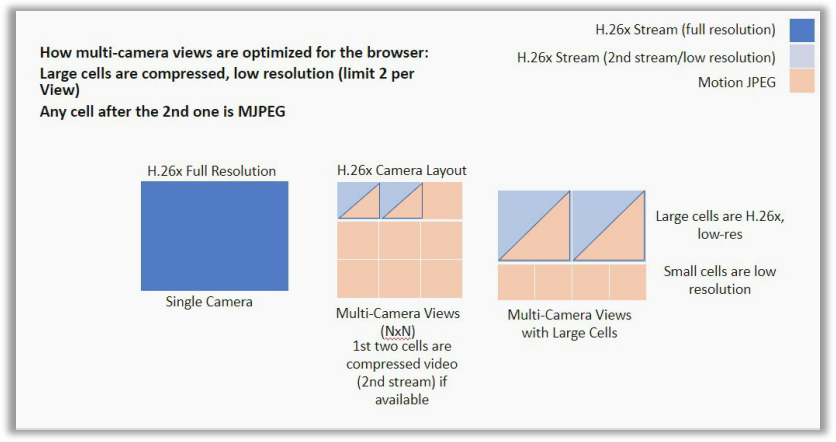
HTTP:
- 1 Camera View - Full resolution H.26X stream
- 2 Camera View - Both use second stream IF available, or else use MJPEG
- 4 Camera View - First 2 cameras use second stream IF available, all others use MJPEG
- 8 Camera View - First camera use second stream IF available, all others use MJPEG
- 9 Camera View - First camera use second stream IF available, all others use MJPEG
- 10 Camera View - First 2 cameras use second stream IF available, all others use MJPEG
- 13 camera View - Center camera uses second stream IF available, all others use MJPEG
- 16 Camera/18 Camera/19 Camera/24 Camera/25 Camera/36 Camera - First 2 cameras use second stream IF available, all others use MJPEG
HTTPS:
- 1 Camera View – Full resolution H.26x stream
- All other camera views use the secondary MP4 stream IF available, or else use MJPEG
Article number:apac-en123016
Last updated:June 13, 2025
Was this article helpful?