How can I configure the WV-ASM300 to use only specific port numbers when connecting to cameras?
- Network Cameras
- Management Software(ASM)
- Installation/Configuration
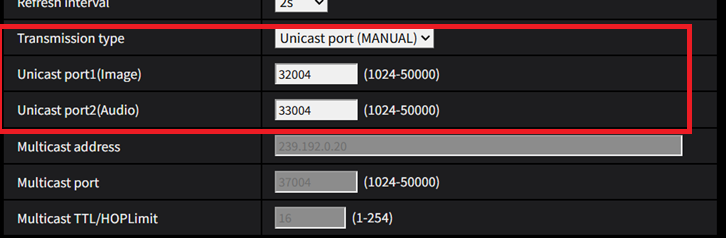
You can specify a particular port by setting the [Transmission type] to “Unicast port (MANUAL)” in the camera settings.
WV-ASM300 needs one video receiving port and one audio receiving port separately and each setting range is as follows:
The range of video receiving port: From 12600 to 13598
The range of audio receiving port: From 13600 to 14598
It cannot be received the multiple camera videos or audios only in one receiving port.
You should set the specified port numbers among the above ranges on the camera settings.
Transmission: Unicast (MANUAL)
Unicast port1(Image): For video receiving port
Unicast port2(Audio): For audio receiving port
If a firewall is enabled on your network, please make sure that the port configured for the camera is added to the firewall's exception (allow) list.
Article number:apac-en124661
Last updated:October 21, 2025
Was this article helpful?