Why is an error displayed in the recorder IP address setting?
- Network Recorders
- Troubleshooting
Problem Description
When attempting to configure other network ports of the NVR (Ex. PC Port), the following error displays:
“Incorrect IP address entry”
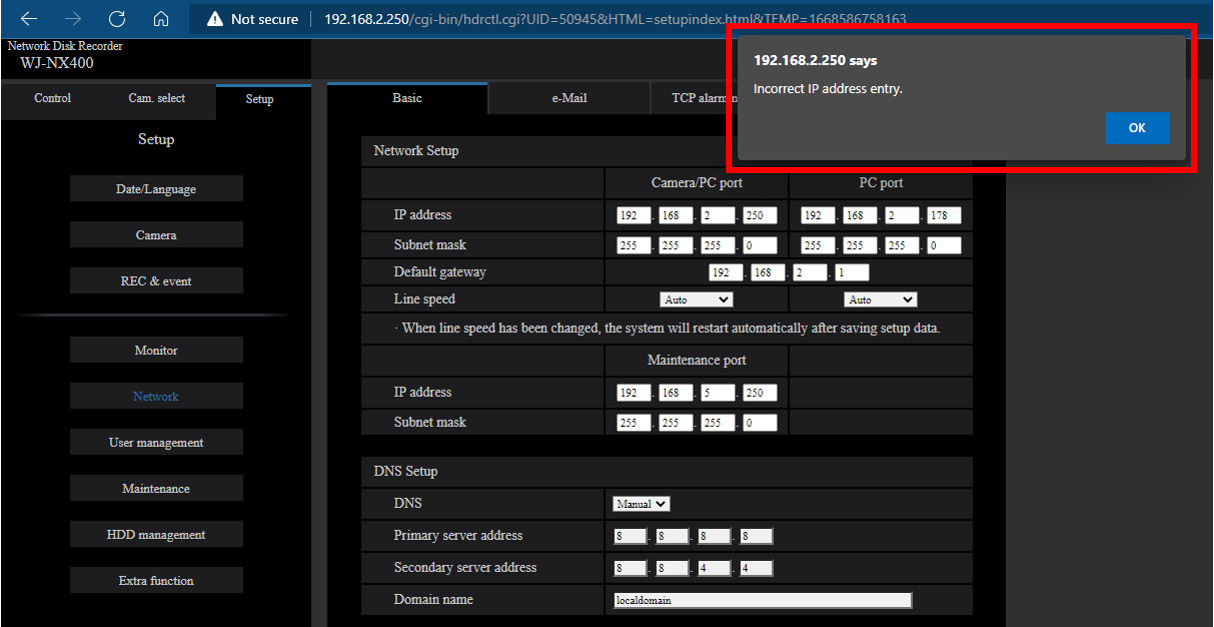
The issue comes from the fact that the PC Port was being configured on the same network group as the Camera Port.
In this example, they are both in the 192.168.2.x network group.
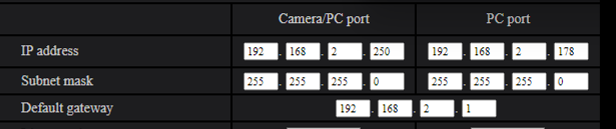
Using the 2 network ports does not increase the performance of the NVR.
If it’s required to use both ports on the NVR, typically to separate traffic between cameras and client PCs, then the Camera Port and PC Port should be configured on 2 different network groups.
Example:
Camera Port = 192.168.0.250 , Subnet 255.255.255.0
PC Port = 192.168.1.250 , Subnet 255.255.255.0
This solution is applicable to all i-PRO network recorders with multiple network ports:
WJ-NX400, WJ-NX300, WJ-NX200, WJ-NV300, WJ-NV200, WJ-ND400, WJ-ND300(A)
WARNING:
This error does not display on older recorders, such as the WJ-ND400 or WJ-ND300(A).
The system allows you to configure both the CAM and PC Port IP in the same network group.
Avoid such a configuration, otherwise the NVR will experience instability.
Various issues may show: Camera connection issues, NVR connection issues, recording issues, intermittent rebooting, continuous rebooting, etc.
Article number:us-fr124636
Last updated:June 19, 2025
Was this article helpful?