How do I set an alarm notification on WV-ASM300 for HDD failure or camera video loss detected by recorder?
- Management Software(ASM)
- Installation/Configuration
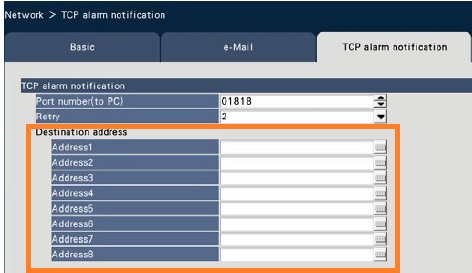
In a recorder, set the IP address of WV-ASM300 as notification destination of the alarm. In WV-ASM300, confirm that both “Error” and “TCP alarm notification reception” settings are ON (Default). Then set to allow WV-ASM300 to the firewall of the PC on which WV-ASM300 is installed.
1.Recorder (e.g. WJ-NX400
Go to the [ Network ] page → [ TCP alarm notification] tab, and enter the IP address of WV-ASM300 in “Destination address”
2. WV-ASM300
2-1. Error setting:
Click the [ Event ] button → [ Error ] tab, and confirm that “Pop-up notification” is ON

2-2. TCP alarm notification setting:
Click the [ Communication ] button → [TCP alarm notification reception] tab, and confirm that “Alarm notification (TCP alarm notification)” is ON

2-3. Firewall exception setting:
On the PC, open [ Control panel ] → [ System and Security ] → [ Windows Firewall ] → [ Allow an apps through Windows Firewall ], and click the [ Change settings ] button
For Details, it is available at the following URL.
WV-ASM300 | i-PRO Products
File : WV-ASM300 Operating Instructions (English)
Chapter : 3.17. Exceptional settings of Windows Firewall
Article number:us-fr122211
Last updated:June 18, 2025
Was this article helpful?