How can I fix the NG Error in WV-ASM300 (firmware related)
- Management Software(ASM)
- Troubleshooting
When I try to download a video using the WV-ASM300, I get an "NG" error and the solution below does not work.
When downloading a clip the customer gets a status bar that immediately changes to NG
Possibly, the download was working previously, but after updating the NX recorder's firmware, the NG Error now appears.
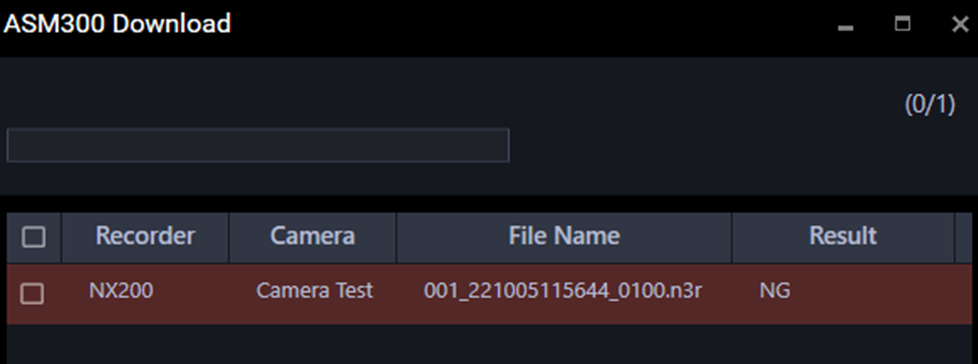
Set the “n3r file download method(NX Series)” to extension in the ASM300 to download videos.
After upgrading ASM300 to the latest version, you get NG errors when trying to download videos. This may occur for the following reasons:
- Previously NX series NVRs and ASM300 downloaded video using FTP protocol
- On newer firmware of the NX recorders, the FTP access was disabled
The Solution to this issue is set the “n3r file download method (NX Series)” to extension in the ASM300 Software.
(Go to Setting -System - Basic Setup -nr3 file download Method (NX Series) -Extension. Hit Set in the bottom and restart the Software.
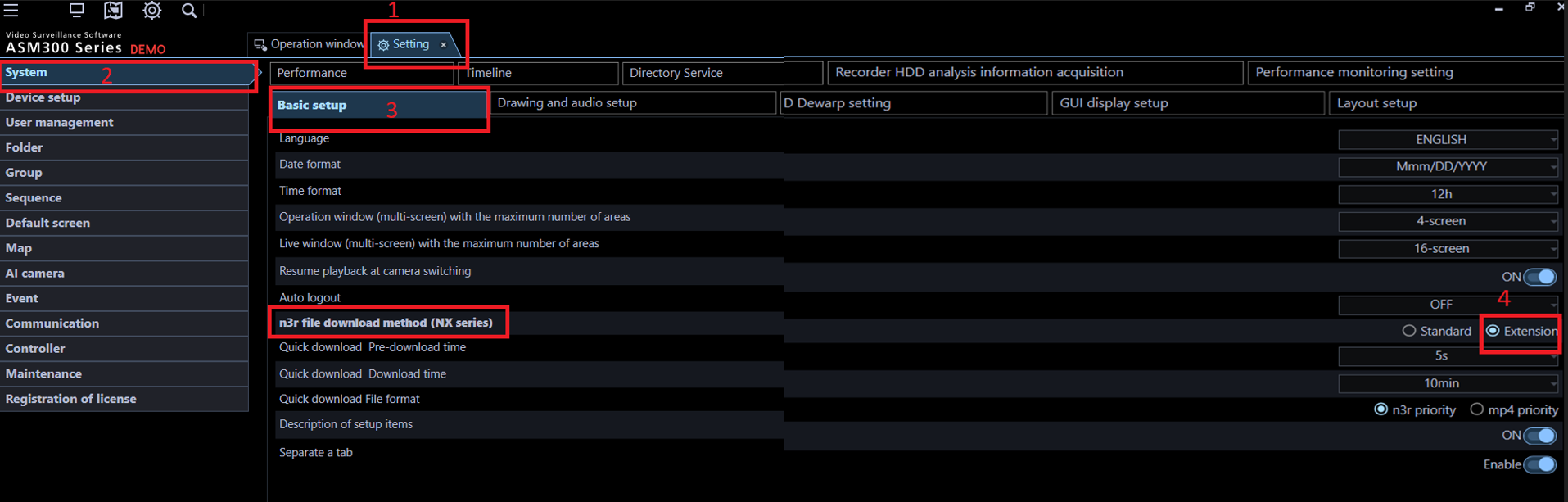
Standard downloads via FTP, while Extension downloads via HTTP
Setting it to Extension will not affect the unsupported models, for older NVRs, it will download as the Standard method automatically.
Note:
If your ASM300 is an older firmware version, the same problem will occur if you purchase a new NX series NVR or upgrade your current NVR to the latest firmware. In this case, the ASM300 software must be upgraded before this procedure.Article number:us-fr124701
Last updated:June 24, 2025
Was this article helpful?