How can I perform an OEM flash to a card reader and restore it to its original Mercury model number?
- Video Insight VMS
- Installation/Configuration
Problem Description:
Why would anyone need to do an OEM flash? Occasionally, when an Integrator is taking over from a different company they may want their Controllers to show Mercury branding, instead of another brand.
The OEM flash would set the OEM ID in the Controller web interface to 1 and restore the branding and model back to the original Mercury model number. This can be executed through the AC Manager.
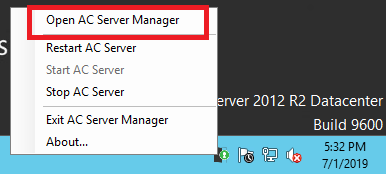
1. Right-click on the Monitorcast icon located in the System Tray, and click "Open AC Server Manager"
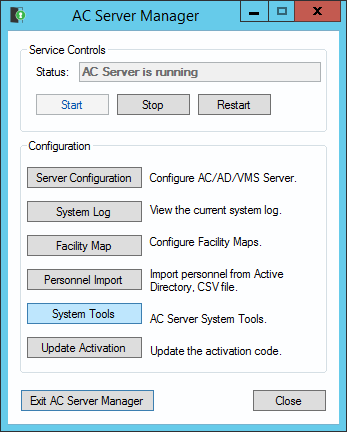
2. In the AC Server Manager, click “System Tools”
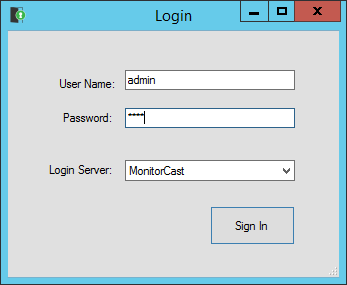
3. Log into the Server with an account that has Admin privileges
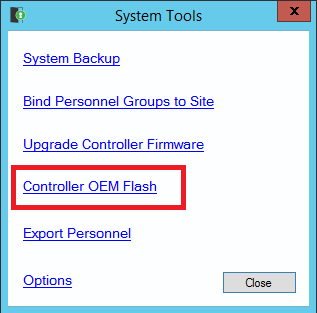
4. Click "Controller OEM Flash"
5. In the Controller OEM Flash window, select the Company OEM
6. In the same window, select the Controllers you would like to flash
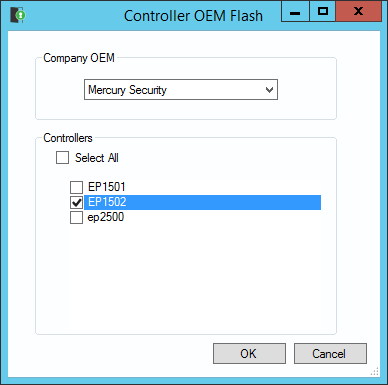
7. Click OK
Article number:us-fr124371
Last updated:October 16, 2025
Was this article helpful?
Thank you for your feedback!